
.svg)
.svg)

By Kaylee Peterson, Director of Client Services
We’ve all seen the ads. “Build a custom website in under an hour with AI.” Pick your poison: Lovable, Base44 — new ones pop up every day.
Just last week, a client decided they could no longer handle the back-and-forth of working with their web designer during a brand redesign and were going to build the site themselves in Base44. Thankfully, they stopped first and asked us (their SEO partner) about the SEO risks of using an AI site builder.
I get the appeal of these builders. I’ve seen the output. Stunning custom sites with gorgeous layouts built to be fully functional in just an afternoon.. The kind of visual polish that could take weeks of back and forth with a traditional design experience
But as with most things in life, all that glitters is not gold.
Here's the thing I've learned after seven years in SEO, across dozens of website rebuilds and migrations: a beautiful website that search engines can't read is an expensive decoration. And most of these AI website builders are creating exactly that.
The technology can be impressive, and AI has its place in marketing. But after experimenting myself and watching excellent brands launch on these platforms, I know how the story ends. You celebrate the launch. Then three months later, you're staring at flat traffic, wondering what went wrong and realizing you're locked into a platform you can't easily escape.
So let's talk about what these AI website builders don’t want you to know.
The JavaScript Problem
Most AI website builders create what's called client-side rendered (CSR) applications. If your eyes just glazed over at the technical jargon, stay with me — this matters for your bottom line.
When a search engine bot visits a traditional website, either custom-built or hosted on a site like WordPress or Webflow, it reads an HTML file that contains all your actual content. Your headlines, your service descriptions, your carefully crafted value propositions. The bot sees it, indexes it, and ranks it.
When that same bot visits an AI-built site, it gets an HTML file that's essentially empty. Just a [<div id="root"></div>] and a script that says "run this JavaScript to build the page."
Most bots don't run JavaScript. They take one look at that empty container and move on. They don’t have the key to unlock the gate your content is now nested behind.
The Impact of Client-Side Javascript Rendering on Your Site’s Discoverability
Google's crawler can execute JavaScript and will eventually index your content. But it's a secondary process - slower, less reliable, and you're basically hoping their rendering budget includes you that day. You take a risk every time you serve your content in JavaScript first (or only).
AI search engines like ChatGPT and Perplexity? They don't execute JavaScript at all. Your content is completely invisible to them. And while AI search is still emerging, ignoring it now means playing catch-up later. Growing your brand visibility means being accessible to LLMs.
Not to mention:
- Social media crawlers only read static HTML. Your Open Graph tags might work, but they can't pull dynamic content.
- International search engines like Bing, Yandex, and Baidu have limited or no JavaScript rendering.
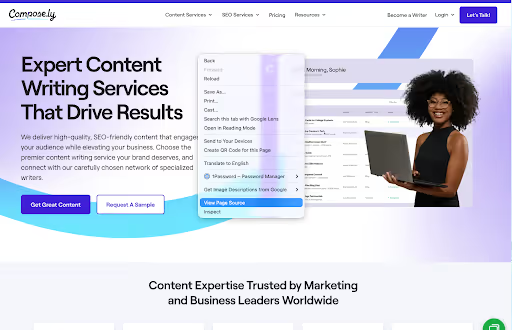
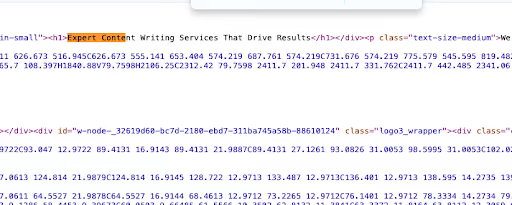
I tell clients to do this test: right-click your homepage, select "View Page Source," and try to read your actual content in that code. If you can't read it, most of the internet can't either.
The AI Web Builder Collaboration Nightmare (That Nobody Mentions Until It's Too Late)
I watched this play out for a client recently. Their head of marketing built a beautiful site in Framer under her personal Framer account. They launched it, and everyone celebrated. Three months later, she accepted a job offer elsewhere.
Suddenly, the company was scrambling to:
- Transfer account ownership (which the platform barely supported)
- Document all the custom configurations before she left
- Figure out who now "owned" the website
- Train someone else on a platform nobody else had ever touched
Meanwhile, the SEO team had a backlog of optimizations they couldn't touch because they didn't have access. Months of recommendations, just sitting there. The content team couldn't update the copy without going through a single point of contact. There was a single point of failure for the entire marketing function.
Even if these platforms offer "team plans," the permission structures are usually built for solo creators, not marketing teams. Yeah, you can add collaborators. But good luck explaining to your developer why they can't clone the environment and work locally. It’s painful watching your SEO team submit "edit requests" through a UI instead of just logging into WordPress and updating meta tags themselves.
Collaboration is possible, but only with friction at every step. And in fast-moving marketing environments, friction kills momentum and costs you money — whether in lost productivity or the credit-per-edit system these platforms have introduced.
The Pricing Structure That Punishes SEO
Remember how I said these platforms look more affordable than a web design or development team upfront? Let me show you the math that nobody walks through before you commit.
The Credit to Edit System
Most AI builders work on credit systems. You might get 5-10 free edits, then you're buying credits. Every new idea, tweak, or revision costs money.
Want to A/B test three different headlines based on search data? It takes about three generations to create them, and then another two or three to make improvements based on the results. So, you can expect a total of five or six generations at $2 to $5 each, or $10 to $30 total.
Here's what actual SEO optimization looks like month-to-month:
A month’s worth of SEO optimization could cost between $80 and $375 in tokens alone, and that’s before you've paid for hosting, your domain, or the base subscription.
On WordPress or Webflow, you can get unlimited edits for the cost of your labor. Sure, you’ve got your annual hosting fee baked in, but that’s a fee you can plan for, unlike an unknown monthly token charge that depends on how much progress you’d like to make on your site.
I had a client last quarter who spent $400 in editing credits just to implement basic SEO recommendations from our audit. On any traditional CMS, that would have taken an afternoon and cost exactly zero dollars.
What If You Have In-House Dev/Design Resources?
If you already have developers and designers on staff, the math gets even worse for the AI builder. Your team's time costs money whether they're building on an AI platform or a traditional CMS. But with AI builders, you're paying for:
- Salary/time to work within the platform's constraints
- Platform credits for every iteration and edit
- Friction time costs from the collaboration limitations we discussed earlier
Meanwhile, with WordPress or a custom framework, your team gets:
- Full control over the codebase
- Ability to work in their preferred tools and workflows
- Zero per-edit platform fees
- Proper version control and deployment pipelines
Why pay credits on top of your team's salaries to work in a restrictive platform, when they could make unlimited changes for free in a proper CMS?
SEO requires constant iteration. You can't optimize what you can't afford to edit.
Site Build Cost Breakdown
Scenario: Small business without in-house dev/design
AI builders absolutely look cheaper upfront. There are no design or web development costs in Year 1, because you're doing it yourself with AI assistance. For a scrappy start-up, that’s the dream scenario.
But when you’re ready to evolve beyond the initial build, the credit-per-edit model means ongoing costs stay high forever. Whether your marketing team, developers, or agency is making the changes, every site edit costs you money. CMS like WordPress or Webflow have higher upfront costs but minimal ongoing fees.
By Year 3, most businesses will have paid more for the AI builder than a professionally built site, and they'll still need to migrate eventually, when the JavaScript-only functionality is no longer serving all of their search goals..
The real cost comparison over three years:
- AI builder: $3,645-15,650
- WordPress/Webflow: $3,465-9,780 (including initial professional build)
When AI Web Builders Make Sense
I'm not here to tell you these platforms are categorically bad or have no place in our ever-adapting marketing world. They're not. I've used them myself. As always — time and place, people.
If you know what you want visually but struggle to articulate it to a designer, these tools are perfect for exploration. You can try five different layouts in an afternoon. You can show your executive team three design directions and get buy-in before you've spent a dollar on professional design. You can tweak and iterate to your heart’s content without being chained to a 50-thread email conversation with so many screenshots and Looms, you’ve officially lost the plot.
Here's the AI builder workflow I actually recommend to clients:
Phase 1: Use the AI tool for design exploration
- Play with Base44, Framer, Lovable, v0, whatever gets you excited
- Experiment with layouts, color schemes, and component arrangements
- Find the visual direction that feels right
- Create a budget of $20-100 in credits
- Limit your timeline to a few days
Phase 2: Hand it off to professionals for the actual build
- Give your designer screenshots and design tokens (colors, fonts, spacing)
- Have a developer build it properly in Next.js, WordPress, or another SEO-friendly framework
- Let your SEO team implement proper meta tags, structured data, and technical infrastructure
- Set up team access, version control, and staging environments
- Budget your upfront costs (usually between $3K and8K)
- Timeline: 4-6 weeks (depending on scope)
Phase 3: Optimize forever without financial penalties
- Unlimited edits for testing and iteration
- Proper collaboration tools for your whole team
- Scalable infrastructure that grows with your business
- Budget $30-$100 per month for hosting
Think of it like sketching your dream home. You wouldn't draw it on an Etch A Sketch, love the design, and then try to live in the Etch A Sketch. You'd take that sketch to an architect who builds it with actual foundations, plumbing, and electrical systems that won't collapse when you need to make changes.
Same principle here.
What to Do If You've Already Launched on One of These Platforms
First: don't panic. You're not alone, and this is fixable. Our team has guided clients through this migration more times than I can count, especially recently.
Short-Term: Stop the Bleeding
- Make absolutely sure your meta tags (title, description, Open Graph) are in the static HTML, not rendered in JavaScript
- Consider a prerendering service like Prerender.io to serve static HTML snapshots to bots
- Submit your sitemap to Google Search Console and monitor what's actually getting indexed
Long-Term: Plan Your Exit
- Start planning your migration to a proper CMS or custom build
- Document your design system now so the rebuild can match your current look
- Work with an SEO team to ensure the new site is built right from the foundation up
You don't have to lose the design you fell in love with. You just build it on infrastructure that actually works, and that you can build on for years to come.
And when a migration is done correctly with an experienced SEO team, you don’t lose any of the value or effort you’ve invested.
Craft the Vision with AI, Build the Boat with SEO
I've been doing this long enough to know that "Just rebuild your entire website" isn't advice anyone wants to hear, especially when you just launched something you're proud of.
But I've also been doing this long enough to have sat through too many strategy calls where a founder or marketing director looks at their analytics and asks "Why isn't this working?" when the answer is right there in the code: their beautiful website is invisible to the internet.
These AI builders are remarkable tools for design exploration. They have terrible infrastructure for production marketing websites that need to perform.
If you're visually oriented but not a designer, absolutely use these platforms to explore and communicate your vision. They're incredible for that. But once you've landed on a design you love, treat that as a deliverable to hand off, not a final product to launch into production.
Your SEO team will thank you. Your developers will thank you. Your future marketing hires will thank you.
And your search rankings will reflect the difference.
Need help migrating from an AI-built site to a proper SEO infrastructure? Or want to build it right from the start? Reach out to our team. We've done this migration dozens of times and can preserve your design while fixing the technical foundation that actually drives results. Book a free audit call to see what's holding your site back.


